Chat as a group.
Invite people you’re connected with. Any member can invite their connections. This is another way to meet new people and expand your Network.
Example CircleThe side-project crew
Closes after 7 days without a message.
The tour
Your page. Sharing. Chats. Circles.
Create your profile Add to home screenAdd what you want people to know.
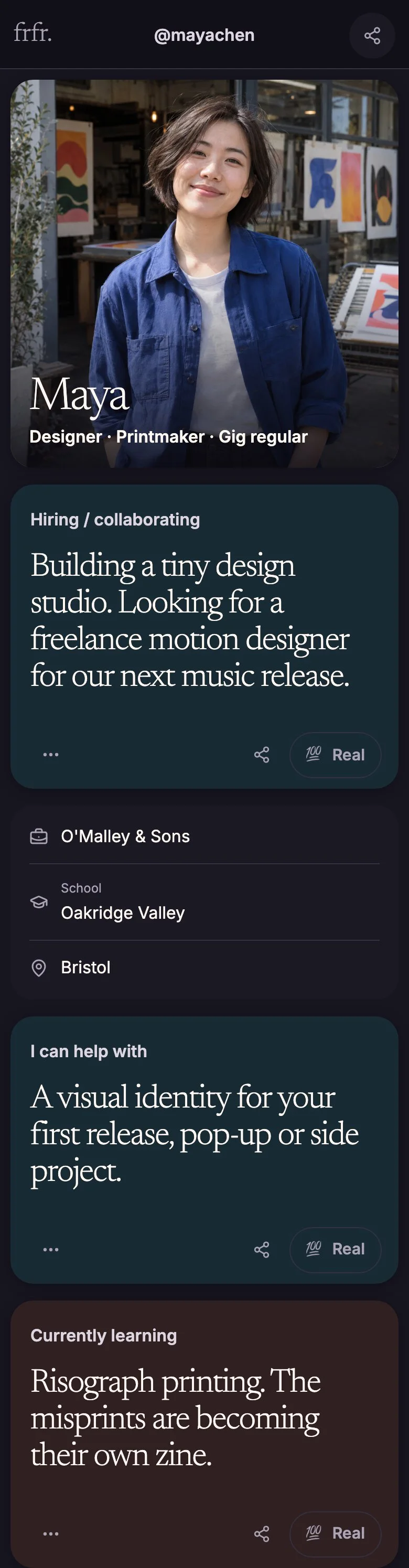
maya.example/portfolio
Example linkMaya1 / 5
Scroll to explore · Swipe for the next profile
Example profiles, not real accounts.
A Real is a request to connect about a card. Add a note. They accept → you can chat.
Building a tiny design studio. Looking for a freelance motion designer for our next music release.
💯 Send Real“I make motion graphics. Want to see my latest project?”
Illustration, not a real conversation.
Invite people you’re connected with. Any member can invite their connections. This is another way to meet new people and expand your Network.
Closes after 7 days without a message.
Green ring = an updated profile.
Open FRFR with one tap, without finding a browser tab.
In Safari or Chrome on your phone.
Choose Add to Home Screen.
 FRFR
FRFRTap the FRFR icon to open the app.
Want alerts? Open the app → Settings → Enable notifications.
In the Share menu, scroll down to Add to Home Screen.
If there’s an Open as Web App switch, turn it on so FRFR opens as an app rather than a browser tab.
Safari instructions ↗Chrome instructions ↗You know how “so, what do you do?” never quite covers it? That’s what FRFR is for. Put your work, projects, interests and whatever else feels like you on your page, even your 30-sec elevator pitch. Share your links, and give people something to start a connection.
Nope. FRFR is for making professional connections, finding people to collaborate with and connecting over shared interests. Honestly, we were getting a little tired of the toxic positivity and endless humblebragging on the site that shall not be named. 👀
You know when you meet someone and try to explain what you do without turning it into a whole presentation? Send them your FRFR link.
Add a quick intro, show a few projects and include what you’re interested in or looking for—collaborators, clients, your next opportunity. Put your link in your email signature, or let someone scan your QR code when you meet.
And leave room for a little personality. Your work matters, but people like knowing who they’re working with too.
Nope. Maybe you’re building something, learning something or really into something most people haven’t heard of. That belongs here too. The résumé can be added too!
Nope, just open FRFR in your browser. If you’d rather not hunt through your tabs every time, you can add it to your home screen.
That’s where discovery is coming. We’re growing the community before opening it up, so there are people you’ll actually want to meet. In the meantime, share your link, check out the pages people send you and send a Real when something catches your interest. You can already start connecting that way.
They’re little milestones for the Reals you’ve received. Something on your page resonated with people, and we think that’s worth celebrating.
Want to change something on your page? Go to Me → Edit profile.
For visibility, notifications and account settings, head to Settings. That’s where the practical stuff lives.